Let sponsors bid for the top spot.

A self-hosted leaderboard where placement is bought, not negotiated. Every listing is ranked by how much it has paid. To move up, pay more than the listing above you — and what you have already paid keeps counting.

PHP 8 MYSQL 8 SELF-HOSTED NO BUILD STEP

How it works

Follow one board through four bids. The numbers are the whole product — this is the arithmetic your sponsors will be doing.

1

Someone claims the empty board

Your board has a minimum bid — say $50. The first listing pays it and holds number one alone.

Northlane Labs pays $50  →  #1 · $50
2

A competitor passes them

Passing a listing costs its total plus your increment. With a $1 increment, taking the top costs $51. The board shows that figure on every row, so nobody has to ask.

Vertex Supply pays $51  →  #1 · $51  ·  Northlane #2 · $50
3

The first one tops up — and pays only the difference

Northlane has $50 sunk into the board already. To get back above $51 they pay $2, not $52. This is the part that keeps people bidding: the money already spent is not wasted, it is a running start.

Northlane pays $2  →  #1 · $52  ·  Vertex #2 · $51
4

And the price of the top spot only goes up

Neither of them can get their money back by stopping, so stopping feels like losing. Each exchange is small; the total climbs well past what either would have agreed to at the start. That pressure is the mechanic, and it is why the board is worth more to you than a flat monthly rate.

…forty bids later  →  #1 · $4,820  ·  next bid $4,821
Nothing expires and nothing decays.

A score that shrank over time would extract more money, and it would read to your sponsors as the site quietly eating their budget — which you, not the software, would have to defend. Totals here are permanent.

Two boards, one set of payments

That mechanic produces one very large number and a top spot nobody new can afford. So every board also ranks on a rolling 24-hour window, and that is the view visitors land on.

Today

Ranked by what each listing spent in the last 24 hours. Yesterday's leader does not hold today's top spot, so the price of #1 resets to something a newcomer will pay — and there is a reason to come back tomorrow.

All time

Ranked by everything ever paid, never expiring. This is the trophy: the listing that has committed the most, and the number that keeps climbing.

One source of truth

Both are the same payments seen through different windows, not two running totals. There is one number to keep honest, and a nightly job that checks it.

What your visitors see

One page, ranked by total paid, updating itself as bids land. Every row shows what it costs to pass it.
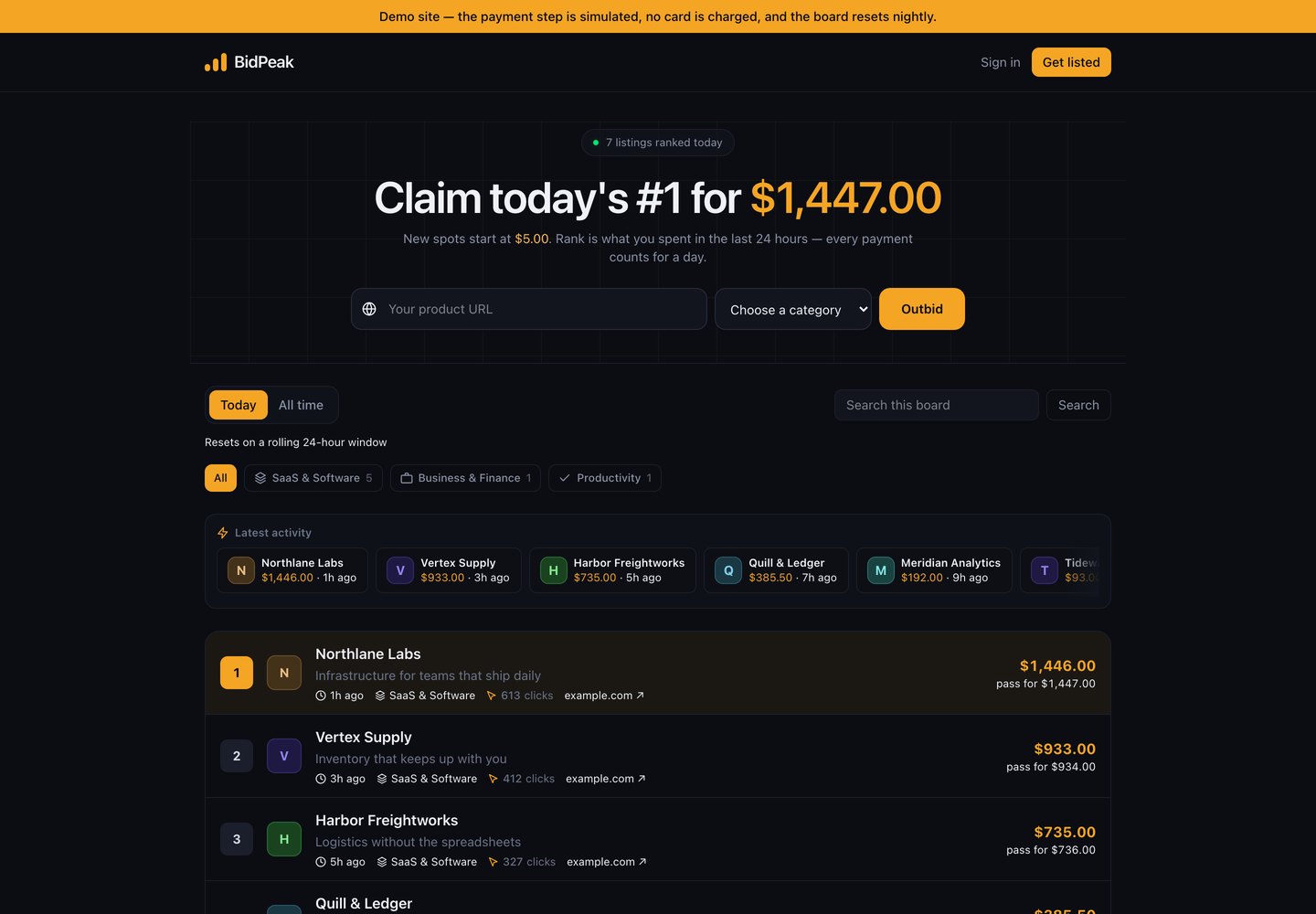
A BidPeak board showing seven sponsors ranked by amount paid, each row with the price to pass it.
A live board. Each row carries the listing's icon, what it does, when it last moved, its category and how many people it has sent onward — plus the price to pass it.

It updates while you watch

Ranks and amounts refresh every few seconds and rows change places, with a live activity list showing who just moved and by how much.

Every listing gets a page

A shareable page per sponsor with a generated social image showing their rank — so the people who paid do your marketing, because the rank is worth showing off.

Unlimited boards

Run one ranking or twenty from a single install. Each has its own listings, its own minimum bid, its own increment and its own number one.

An empty board is handled

Before anyone has bid, the board names the prize instead of showing a blank table — the first listing takes the top spot alone.

Click tracking

Every outbound click is counted and shown on the row. This is what a sponsor actually bought, and the number that makes their second bid easy to justify.

Categories

Filter chips across the top, with counts. A visitor looking for one kind of thing finds it, and a sponsor competes with their own kind rather than everybody.

Bid without leaving the page

The URL field and category picker sit in the board's header, above the ranking. Nobody has to find a second page to get listed.
What you get as the operator

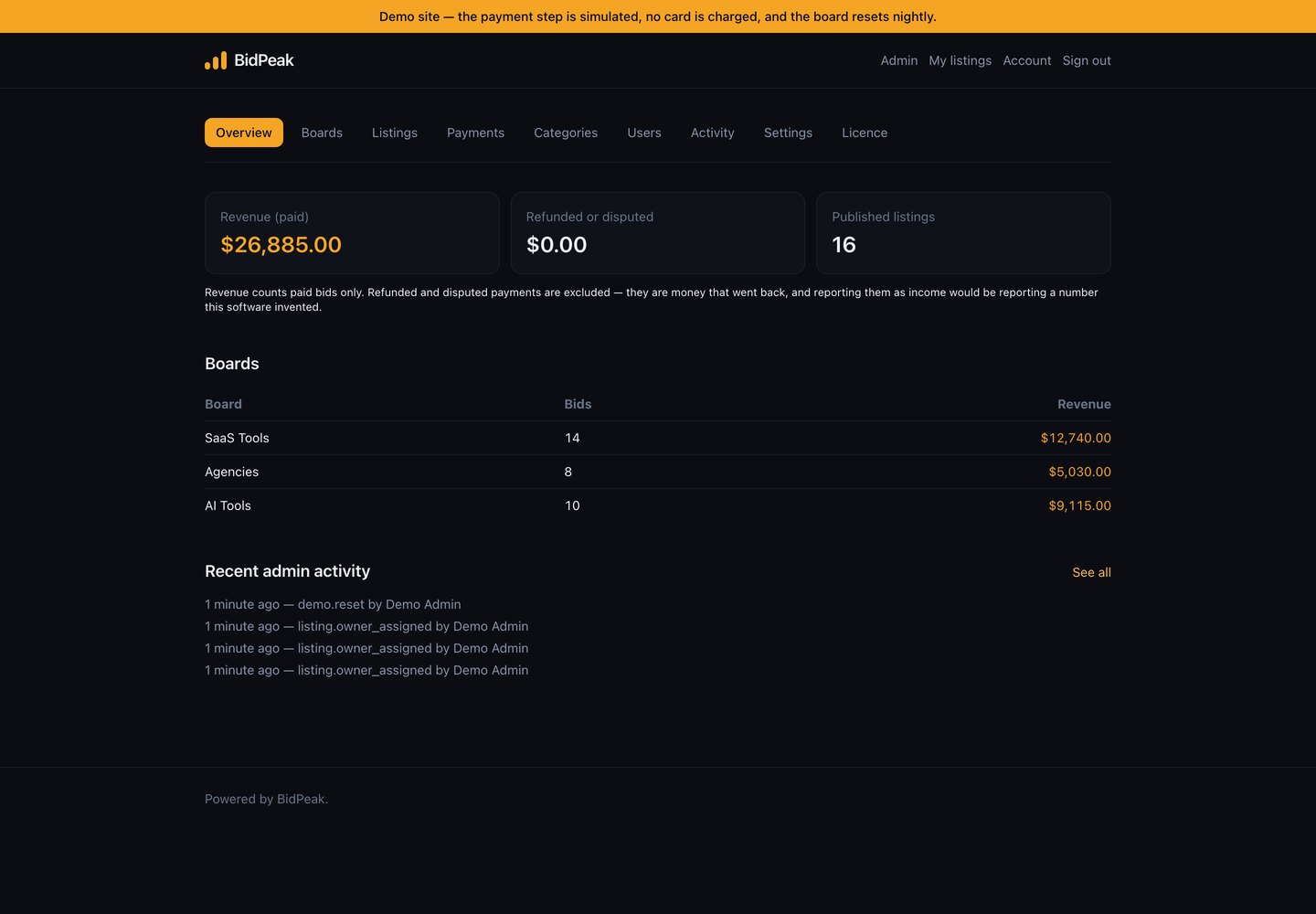
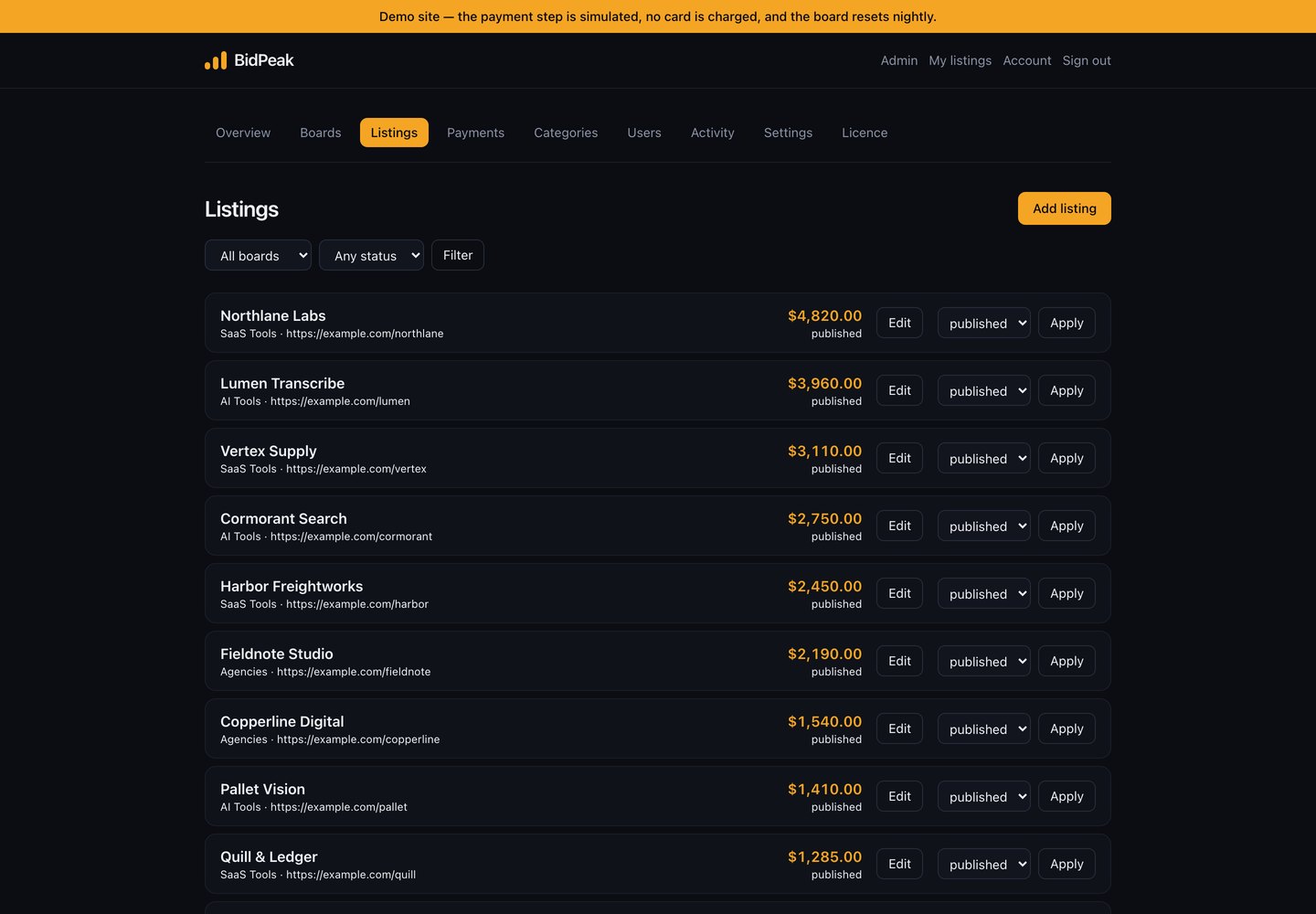
Boards, moderation, revenue and an audit trail. Everything below is in the download.

The BidPeak admin overview showing revenue, refunded total, published listing count and revenue per board.
Revenue, refunds and listing counts at a glance, broken down per board. The figures come from recorded payments, so they reconcile with your Stripe dashboard.
The BidPeak admin listings screen, filterable by board and status, with a status control on each listing.
Every listing across every board, filterable by board and status. Changing one is a dropdown and a button, and each change is logged with who made it.

Set the price of entry

Minimum bid and minimum increment, per board. A small increment keeps the board lively; a large one makes each move count. You can change either at any time without disturbing existing listings.

Add sponsors by hand

For somebody who paid you by invoice, or to launch a board with something on it. The amount is recorded as a real payment, so it shows in revenue and survives the nightly reconciliation.

Moderate without losing the record

Hide or remove a listing and its payment history stays. Deactivate a whole board rather than deleting it — those listings were paid for.

Audit log

Every administrative action, with the acting user and, for anything changed, the state on both sides of it. Useful when there are two of you, essential when a sponsor disputes something.

Built to be trusted with money

This is a product where a bug costs you real money and a sponsor's goodwill. These are the specific things it does about that, rather than a claim that it is secure.

The browser never sets a price

Checkout sessions are created on your server with an amount your server computed. Editing the form does not buy the top spot for one cent.

The recorded figure comes from Stripe

Not from the page, and not from anything sent back to your site — from Stripe's own record of what was actually charged.

Chargebacks give the rank back

A refund or a dispute drops the listing by exactly that amount. Without this, somebody pays for number one, reverses it through their bank, and keeps the spot.

A repeated webhook counts once

Stripe retries when it does not get a clean answer. A replayed event is recognised and ignored, so one payment cannot become two.

Simultaneous bids cannot lose each other

Two payments confirming in the same instant are serialised, so neither overwrites the other's total.

Nightly reconciliation

Every listing's total is re-checked against its actual payments and corrected if the two ever disagree. The payments win — they are the record of money that moved.

323 automated tests ship with the source.

They cover exactly the cases above: duplicate webhooks, refunds, disputes, forged signatures, concurrent bids, cross-user access and hostile URLs. The suite runs on MySQL, which is what you will deploy on.

Installing it

Upload, create a database, open the site. The installer checks your server before you type anything and tests the database connection before it writes any settings.

1 · Upload

Unzip and upload. Dependencies and compiled assets are already inside — no Composer, no Node, nothing to build on your server.

2 · Point the domain at public/

Or use the public_html arrangement the documentation describes if that is all your host gives you.

3 · Open the site

Fill in one form: database, site address, currency, your administrator account. Optional sample data so you are not staring at an empty board.

4 · Connect Stripe

Paste your keys and create one webhook. The documentation names the exact three events to subscribe it to.

Requirements

PHP8.3 or newer, with pdo_mysql, mbstring, openssl, gd, fileinfo, curl
DatabaseMySQL 8, or MariaDB 10.6 and newer. One empty database.
PaymentsA Stripe account of your own. Every payment lands there directly.
Build toolsNone.

Ordinary shared hosting with PHP 8.3 is enough. There is no queue worker, no Redis and no third-party service beyond your own Stripe account.

Questions worth answering before you buy

Including the ones where the honest answer is “no”.

Where does the money go?

Straight into your own Stripe account. BidPeak takes no fee, holds no funds and has no mechanism to. It never sees a card number — payment happens on Stripe's own hosted page.

Will people actually bid on my board?

Only if there is something on it. A board with no listings is a page with a payment button and nothing to look at, and nobody pays to be first on an empty list. The script helps — sample data, an empty-board state, and a way to add your early sponsors by hand — but filling the first ten places is your job, not the software's. The documentation is blunt about this.

What if Stripe is not available in my country?

Then this is not the right script for you, and it is better to know now. Payments go through Stripe, which operates in a limited set of countries — check stripe.com/global. PayPal is planned but is not in 1.0, so there is no second option yet.

Can I take PayPal as well as Stripe?

Not in 1.0. A second payment provider means a second refund model, a second dispute model and a second webhook, all in the part of the system where a bug costs you money. It is planned rather than pretended.

Can I run more than one currency?

No — one per installation. The ranking is a comparison of amounts, and mixing currencies would make the sort meaningless. Decide before you take the first payment; changing it afterwards reinterprets every existing total.

What happens if a sponsor charges back?

Their total drops by that amount and they fall down the board automatically, as soon as Stripe tells your site. You keep the audit record either way.

Is the source readable, or is it encoded?

Readable. Unencrypted, unobfuscated and commented — which matters rather more than usual for something handling other people's card payments.

Is it translated?

English only in 1.0. The strings are in Blade templates rather than a language file, so translating means editing templates.

Does it work on shared hosting?

Yes, given PHP 8.3 and the extensions listed above. No build step, no queue worker, nothing to compile.

See it running

The login details are on the sign-in page. Place a bid and watch the board reorder, then sign in as the administrator and look at the other side of it. The demo's payment step is simulated rather than taking a card — everything after it, and the Stripe integration itself, is the real thing on your own installation.

Open the demo

The demo resets every night.